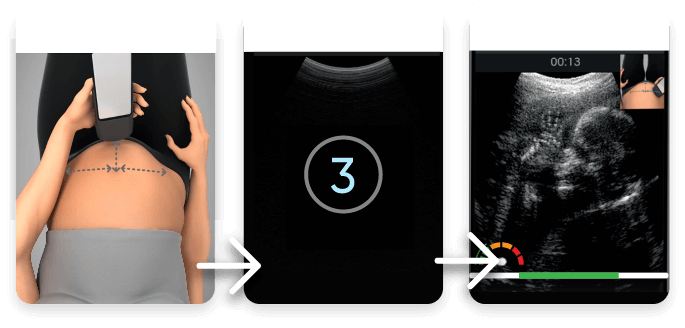
Scan Tutorial
Scan Prep
Scan Page
The scanning process includes 5 steps:
This is the tutorial screen
Here you can pause
Here you can skip the tutorial
This is the scanningscreen
Time remaining forthe scan
The tutorial will guideyou through the scan.
Please follow the
instructions
This is the speed indicator – scan slowly to stay in the green zone
This is the touch indicator – itshould be green. If red, applymore gel and press firmly
Your medical provider will reviewthe scan. Please follow yourphysician's instructions forreceiving the results
Procedure completed successfully!
The upload of the recordedultrasound videos has started.Please don't exit the app until theupload is completed
This is the home screen
Start Scan
1/50
Phone Status
Connected
Device Status
This is a five step procedure.
Each step is preceded with a shortvideo tutorial
Start scan
Here you can see the phone anddevice status: Battery, internet,device connection, and memory
Here you can see how many scans you have left out ofyour total amount
In the menu, you can changethe language, device settings,and get more details
Clicking here will startthe scan process
1. During the scanning session, can you pause the ultrasound scanning?
2. If the touch indicator is red, what should you do?
Before scanning, you'll be asked to:
For more information, visit us at:
pulsenmore.com
To see a video clip , click here